Recently an associate and I were discussing the need for accounting controls in smaller professional service firms. He agreed there was a need, but thought it unrealistic, asking “How can you implement segregation of duties in a ten person firm where one person manages the accounting function?” He made a good point, but I have seen my share of clients living through a myriad of accounting messes that could have been prevented with adequate controls.
What is the answer?
Read More…
Clearview is a tight-knit company, so we’re very intentional about who we hire and promote. We’re excited about two recent decisions that make Clearview even stronger.
First, Rob Wintz has been promoted to CFO. When Rob joined Clearview in 2011 he brought over 30 years of experience as a CPA. We couldn’t be more pleased to have him as our new CFO. Read Rob’s official announcement.
Second, Eric Kimmet joins us as director of customer support. As Clearview continues to grow we want to make sure that our clients get amazing support, and Eric will be a big part of that. Because he used InFocus at the architectural firm he is coming from, Eric hit the ground running. He also has experience with BST and other systems, so he’s able to help clients make the transition to InFocus. Welcome Eric! Read Eric’s official announcement.
 The best way to get good decisions out of people is to give them timely, accurate information that answers their questions. This gives them both the motivation to act and the resources on which to act.
Historically, however, this was not done. Throughout the accounting cycle—usually a calendar month, but sometimes a calendar quarter—operating data was collected that was primarily of interest to the accounting department, mostly numbers preceded by dollar signs.
At the end of this period, after another period called the closing process, reports were printed out, usually defined by what an accounting system could generate.
Much of this information was considered confidential, so it was distributed to the principles of the firm, to the CPA, and maybe to the bank or lending institution that may have provided a line of credit.
Professional service firms like architects and engineers came to realize that there was also important project-oriented data that could be collected, but it tended at first to be collected and compiled on the same cycle, by the same people, printed and distributed to operations personnel, including project managers.
The problem with this cycle is that it provided data that was between one week and six weeks old, in a defined format that may or may not have met PMs needs, and all too often of questionable accuracy. Depending on the PMs workload and the level of detail, these paper reports could have been overwhelmingly voluminous, making it difficult for the PM to find the critical information he needed, and usually long after it would have been helpful.
In many engineering firms several projects could have completely come and gone in this reporting cycle.
Most of today’s professional service reporting systems are capable of much more than what the old system provided, but the old patterns are still followed: print a lot of reports, usually around the billing cycle and distribute them with more emphasis on billing than on control.
Stop It!
Let me propose four changes that will greatly empower PMs to make more timely and accurate decisions.
Read More…

Managing a successful business requires effectively managing cash flow. And managing cash flow effectively means knowing how much cash to have on hand. To know that that we need to understand why cash is needed in the first place, then couple it with a thorough analysis of a firm’s revenue and expense cycles, preferably using an interactive model.
But let’s start at the beginning: how much cash on hand should an A&E firm have?
Do we have enough cash?
Based on what I see from my consulting with A&E firms, everyone has a different idea of how much cash is enough. I’ve seen 20 person firms holding several million dollars of available cash. I’ve seen hundred person firms that keep barely enough cash on hand to meet next week’s payroll. At both extremes, these firms are profitable and appear to be near-term stable, emphasis on the words appear and near-term. That being the case, is there a rule of thumb?
On average, firms in the architectural/engineering design sector maintain cash balances equal to approximately 20% of their total assets. This equates to about 8% of their annual sales, some reporting as low as 4%, others as high as 12%. Benchmarking your firm’s cash balance against some industry standard is not very meaningful, at least not without considerable investigation into what is behind the numbers.
Read More…
We’re excited to release InFocus 2, the culmination of months of effort. It includes some of our most requested features as well as some new ones we think you’ll love. Here’s a quick overview of what’s new.
Project Central
Up to this point managing projects in InFocus involved going to several different applets. No longer. Project Central brings everything together in one streamlined place to view project metrics and manage project budget and resources. Check out the video below to see it in action.
Multi-currency
Multi-currency is now built into InFocus at a fundamental level. Every journal entry, invoice and budget can now be specified in your currency of choice. You can set when you want the currency evaluation to occur and InFocus takes care of the rest. Wherever you do business InFocus is there for you.
Actions (Automated Workflow)
Actions take the power of custom reports and unlocks it to do just about anything. You can use actions to interact with third-party systems or automate complex workflows. There are also hooks throughout the system that allow you to trigger an action when almost anything–clients, vendors, projects–is created or updated. Read more about Actions…

Fresh New User Interface (UI)
The new interface is cleaner, more professional, and a pleasure to use.
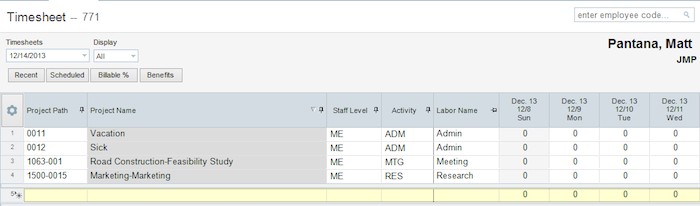
Mobile Update—Now Attach Receipts On The Go
Keeping track of expenses with InFocus is easier than ever. Mobile Time & Expense now supports attaching images to your expense sheet directly from your device. Just add a line item, snap a photo, and you’re done.
And Lots of Details That Make InFocus More Powerful Than Ever
If you are a client at Clearview with support site access, check out the Release Notes for more details. We hope you’ll find this InFocus to be the most powerful version yet.
We’re pleased to announce InFocus 1.4.7, one of our most exciting releases yet. It’s full of improvements, enhancements, features and fixes that we think you’ll really enjoy. Here are some highlights:
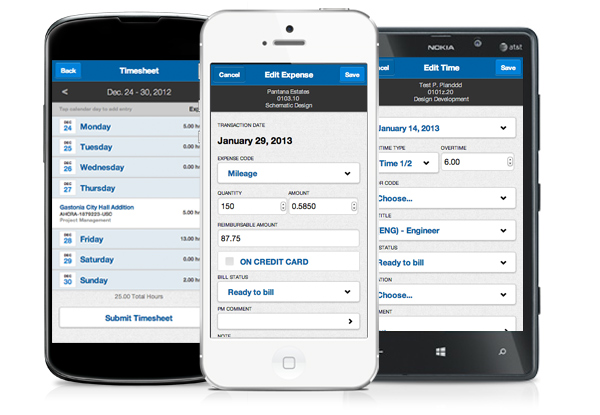
Mobile Time & Expense. InFocus now includes a mobile optimized web app that works on iOS, Android and Windows Phone 8. Since it’s browser based, you can also access it from any modern browser on Mac or Windows, including Chrome, Safari, Firefox and IE 9+.
Custom Screens. You can now customize the layout of fields, field requirements, UDF placement, tabs, sections, and labels in the following applets: Firms, Contacts, Opportunities, Clients, Vendors, Employees, and Projects.
Maps. Yes, maps! With our new Bing powered Map Viewer, you can write and run queries that plot on a map. You could, for example, view the location of larger prospects. Seeing is believing on this one, so look for a video tutorial.
And while not a feature of InFocus, there’s one more thing worth mentioning:
Brand New Online Support Center. With the launch of 1.4.7 we’ve created an entirely new Clearview Support site with easier ticket management, InFocus FAQs, expanded video tutorials and a complete invoice history. It looks and works great on your mobile device, too.
We’re only scratching the surface. InFocus 1.4.7 includes dozens of improvements and fixes. Clients can see a complete list of them and instructions on how to upgrade in the InFocus 1.4.7 Release Notes (Clearview Support account required to view).
We’re excited to announce InFocus in the Cloud, available immediately starting at an amazing price: $19/user/month. This is a perfect fit for any firm that doesn’t want to maintain their own servers for running InFocus. Or for firms who simply want the convenience and peace of mind of letting us take care of the infrastructure and backups.
InFocus in the Cloud isn’t a watered down version. It’s the full-blown native Windows application with all features*. So you get the speed and power of a desktop app without having to worry about the backend infrastructure. And it’s always up-to-date. InFocus automatically updates itself without the need to manually run an installer.
We expect InFocus in the Cloud to be a hit with lots of AE firms.
So what’s next at Clearview? We’re bringing the most common functionality of InFocus, like time and expense, to all platforms and mobile devices. These HTML5 web apps will be released in the coming months for both InFocus in the Cloud and InFocus In-House.
*Document management will be available in the Cloud with the next release of InFocus

Predicting Profit Accurately
All design firms have to factor in overhead when calculating project profitability. There are two main approaches for doing this: the Job Cost Rate approach and the Overhead Allocation approach. Most software packages offer one approach or the other. Sema4, for example, uses Job Cost Rate, while Advantage and Vision use Overhead Allocation. InFocus is unique: it offers both approaches. Let’s review how each approach works.
The Job Cost Rate Approach
Job Cost Rate is often referred to as burdened payrate because it’s an hourly payrate plus an hourly overhead rate. Job Cost Rate is usually an employee’s pay rate times a standard multiplier. Typically that multiplier is based on a firm’s direct labor and overhead costs at the financial statement level. For example, a firm has the following on their books:
Annual overhead: $1,000,000
Annual direct labor: $500,000
Total: $1,500,000
You’ll notice that the total ($1.5m) is 3 times the direct labor amount ($500k). That means a good Job Cost Rate multiplier is 3.0. This multiplier can be set up in a Job Cost Rate schedule and applied to each direct hour charged in a timesheet.
Say John’s payrate is $100 per hour and he enters 5 hours on his timesheet. In this case here is how the Job Cost Rate is calculated:
$100 * 5 hours * 3.0 Jobcost multiplier = $1500
InFocus automatically stores the Job Cost Rate on John’s timesheet.
Summing up, having a Job Cost Rate makes estimating a project’s profit much more accurate since it accounts for both direct and indirect expenses. InFocus has a global setting that allows a Job Cost Rate to be used instead of Pay Cost in reports.
The Overhead Allocation Approach
This approach uses Pay Cost within the project reports. Overhead is calculated separately based either on a multiplier or a proportional allocation of actual periodic overhead.
Let’s use the amounts from the previous example. This time we will calculate an overhead multiplier not a Job Cost Rate multiplier. We do that by dividing the annual overhead ($1m) by the annual direct labor amount ($500k), which results in an overhead multiplier of 2.0. This multiplier can then be applied to periodic direct labor amounts to represent the allocated overhead for the job.
The InFocus overhead allocation utility provides the user with the ability to enter an overhead multiplier. InFocus then stores the resulting project overhead amounts.
Alternatively, the user can design overhead allocation scripts that will distribute actual overhead for a period across projects proportionally. For example, a project that is consuming 10% of the firm’s direct labor for a period will receive 10% of the overhead allocation.
Conclusion
Overhead has to be accounted for in order to estimate profit properly. Fortunately, InFocus makes this as easy as possible by providing two distinct approaches, the Job Cost Rate approach and the Overhead Allocation approach. There isn’t a right way and a wrong way. The approach you choose depends on your business and accounting practices.
One standard industry method of allocating overhead to projects is to use a predictive multiplier for the current year. Once the year has been completed the actual overhead is calculated from the general ledger and then retroactively applied to the projects for the given year. This can easily be accomplished in InFocus. The first step is to create a job schedule to hold the multiplier by year. Typically the schedule only needs one row to hold the relevant multiplier. Below is an example.
Read More…